
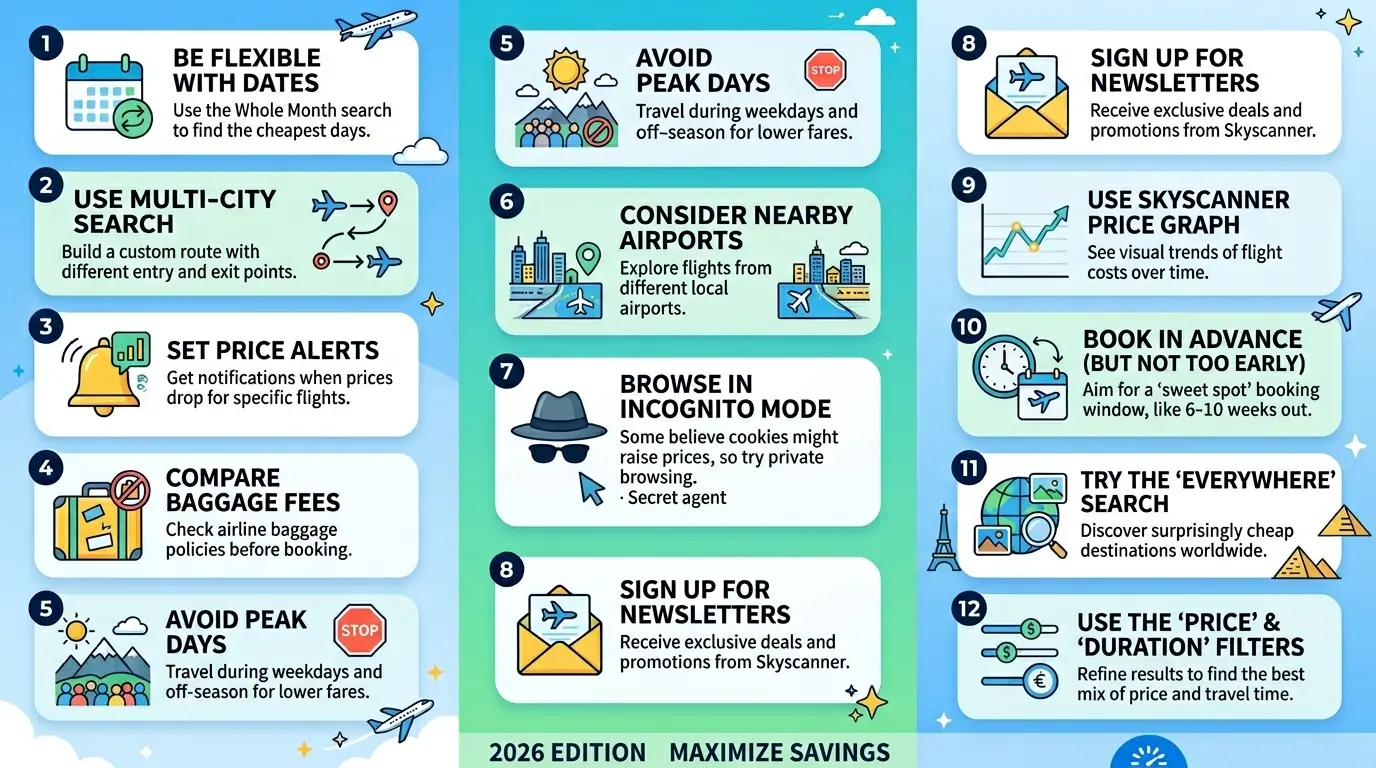
Skyscanner tips to save money on flights work best when you combine search flexibility with timing strategy. The biggest savings come from using the Whole Month price calendar to identify the cheapest travel days, setting price alerts 6–8 weeks before departure, searching from incognito mode to avoid dynamic pricing inflation, and selecting Everywhere as your destination to uncover routes you had not considered. These steps alone can reduce a flight cost by 20–45% compared to booking on a fixed date through a single airline’s website.
Most travelers using Skyscanner overpay not because the tool is limited, but because they use it like a standard search engine enter dates, pick the cheapest result, book immediately. Skyscanner is a price intelligence tool, not just a comparison engine. When you understand how its algorithms, filters, and alert systems actually behave, you stop reacting to prices and start controlling what you pay. This guide covers every technique that produces real savings in 2026, including the ones most travel blogs skip.
12 Proven Tricks That Actually Work (2026 Guide)
1. Use Whole Month View Not Fixed Dates

The single most powerful Skyscanner feature for saving money is the Whole Month price calendar. If you are not using it, you are leaving real money on the table.
When you enter a fixed departure date, Skyscanner shows you prices for that day. But flight pricing is not consistent across a month the same route on the same airline can vary by $80–$200 depending on which Tuesday or Friday you fly.
How to use it:
- Enter your origin and destination
- In the date field, click “Whole month” instead of selecting a specific date
- Skyscanner displays a full price calendar showing the cheapest and most expensive days at a glance
- Select the green-coded (cheapest) dates rather than booking around your original plan
Decision rule: If you have 3–5 days of flexibility in your travel window, Whole Month view will almost always surface a cheaper option. If you have zero flexibility on dates, skip this and focus on Tricks 3 and 7.
At Flightofly.com, we consistently see travellers save $60–$180 per person on medium-haul routes simply by shifting departure by 1–2 days using this calendar. For our full breakdown of best time to book flights by route type, see our dedicated timing guide.
2. Search Everywhere as Your Destination
If you know when you want to travel but not where, the Everywhere destination search is the most underused feature on Skyscanner and one of the highest-value.
Type your origin airport, enter your dates, and type “Everywhere” in the destination field. Skyscanner returns a ranked list of destinations sorted by price from your departure airport on those dates.
This is not a gimmick. It is a real pricing snapshot of what airlines are currently selling. The results often reveal:
- Promotional fares on less obvious routes
- Budget carrier deals not surfaced elsewhere
- Destinations with current airline seat sales
Who this works best for: Flexible travellers who want the cheapest possible trip without a fixed destination common among solo travellers, couples on a budget trip, and digital nomads. If your destination is fixed, move to Trick 3.
3. Always Search in Incognito Mode

Flight prices on Skyscanner and most booking platforms adjust dynamically based on your search history. Use private/incognito browsing for every flight search.
This is not a conspiracy theory it is how yield management works. When you search the same route multiple times, platforms detect repeat interest and may display higher prices, or simply not refresh cached lower fares. Incognito mode clears cookies between sessions and ensures you see current pricing rather than a version shaped by your previous searches.
Quick setup:
- Chrome: Ctrl+Shift+N (Windows) / Cmd+Shift+N (Mac)
- Safari: Cmd+Shift+N
- Firefox: Ctrl+Shift+P
This takes 10 seconds and costs nothing. Do it every time before opening Skyscanner. For broader cheap flight booking tips that cover all major platforms, Flightofly has a full strategy guide.
4. Set Price Alerts But Only for the Right Window
Skyscanner price alerts are powerful, but most people set them too early or too late. The alert window that produces the most bookable deals is 6-10 weeks before departure for short haul, and 10–16 weeks for long haul.
Here is how airline pricing actually works airlines load fares months in advance at moderate prices, then adjust them based on how quickly seats are filling. Understanding why flight prices change daily driven entirely by demand signals, seat inventory, and competitor adjustments is what separates travellers who book at the right moment from those who get caught by a spike.
How to set an alert that works:
- Run your Skyscanner search as normal
- Click the bell icon / “Track prices” toggle
- Enable email or app notifications
- Set alerts for both your ideal dates AND ±2 days around them
What to do when you get an alert: Do not wait. Flight pricing alerts represent a moment in the algorithm, not a fixed sale. If the price is within 10–15% of your target, book it. Waiting for it to drop further often results in it spiking back.
The Tuesday myth that flights are cheapest on Tuesdays is largely outdated for 2026. Airline pricing is now almost entirely algorithm driven, and fare drops happen any day of the week. What matters is the number of weeks out from departure, not the day of the week you search.
5: Use the Skyscanner Price Calendar Across Multiple Months
Do not just check the cheapest days in one month. Compare the cheapest days across two or three months the difference can be substantial.
Some routes have dramatically cheaper fare windows in specific months due to seasonal demand, school holidays, and airline scheduling changes. A flight from London to Bangkok that costs £480 in October might cost £310 in early September or late November.
Decision table When cheapest fares typically appear by season:
| Travel Period | Booking Window for Cheapest Fares | Notes |
|---|---|---|
| January February | 6–8 weeks out | Post holiday low demand |
| March April (Easter) | 12–16 weeks out | Demand spikes early |
| May June | 8–10 weeks out | Shoulder season, good value |
| July August | 14–20 weeks out | Peak season book very early |
| September October | 6–10 weeks out | Best value window of the year |
| November | 4–8 weeks out | Low season, late deals common |
| December (Christmas) | 16–24 weeks out | Book earliest of any period |
This data pattern tracked across booking platforms including Skyscanner, Google Flights, and direct airline sites consistently shows September October as the highest value booking period for most long haul and medium haul international routes.
6: Compare Direct vs. 1 Stop Sometimes Connecting Flights Cost More
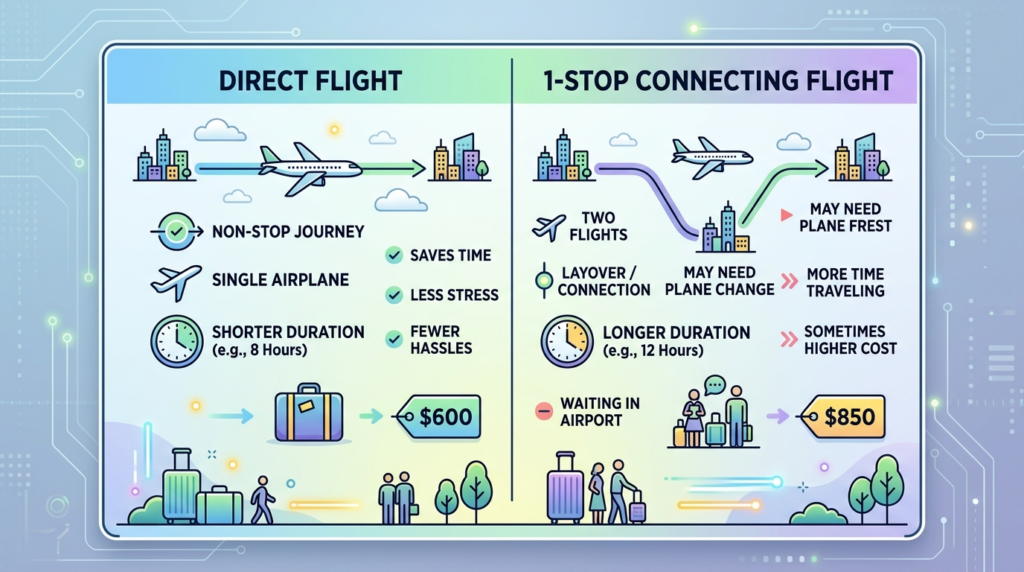
A common assumption is that non-stop flights are always more expensive than connecting ones. This is wrong and making this assumption without checking costs travellers money in both directions.
On popular routes (e.g., London New York, Dubai Bangkok), connecting flights via certain hubs can actually cost more than direct flights when demand on the connecting route is high. Conversely, on thin routes with limited direct service, a single stop can drop the price by 40–60%.
How to check this on Skyscanner:
- Run your search with Direct flights only toggled ON note the price
- Toggle it OFF compare what connecting flights cost
- Also check: is the cheapest connecting flight going away from your destination (e.g., London Dubai Bangkok via a westbound stopover adds hours for marginal savings often not worth it)
The calculation is not just price. Factor in: added travel time × your hourly value of time + airport transfer costs + risk of missed connection. For routes under 4 hours, a $30 saving via a connecting flight is usually not worth the risk or the hassle.
7. Search Nearby Airports Both Ends of the Route
One of the most consistent and overlooked Skyscanner tips: enable the nearby airports filter at both your origin and destination.
Skyscanner allows you to search from multiple nearby airports simultaneously. For a traveler in London, this means comparing prices from Heathrow, Gatwick, Stansted, Luton, and London City in one search. The difference between departing from Heathrow vs. Stansted on the same day to the same destination can be $60–$150 on budget carriers.
How to activate it:
- In the departure field, type your city name (not airport code)
- Skyscanner will offer London (All airports) as an option select it
- Do the same for your destination city
- Results will now compare all airport options simultaneously
Risk to know: Check the ground transport cost from your preferred location to each airport. A £30 saving on a flight from Stansted can disappear if you need a £25 train from central London. Run the numbers, not just the headline price.
For detailed guidance on how to find cheap flights including multi airport strategies, Flightofly has a route by route breakdown.
8. Book at the Right Stage Not the Cheapest Moment You See
The cheapest price you see on Skyscanner is not always the right moment to book. Timing your booking decision is a separate skill from finding low prices.
Here is the framework Flightofly uses for booking decisions:
Book immediately if:
- The price is below the 12-month average for that route (Skyscanner shows this)
- You are within 8 weeks of departure and prices have been rising
- The price dropped after a period of tracking (alerts have notified you of a drop)
- It is peak season travel and you are already 12+ weeks out
Wait and track if:
- You are 16+ weeks out and prices are higher than average
- It is shoulder or low season travel with historically flexible pricing
- The price has been steady for 2+ weeks (no urgency signals)
Do not wait if:
- You are booking December/Christmas/New Year travel these fares do not come back down once they rise
- You are booking a route with limited seats (small aircraft, thin routes)
Most travellers overpay because they book based on convenience, not pricing cycles. They open Skyscanner on a Saturday morning when they have time to book not when the data says it is the right moment. Set alerts, then book when the alert fires, not when your schedule allows.
For a route by route breakdown of optimal timing, our best time to book international flights guide maps out exactly when to act based on your destination and season.
9. Use Skyscanners Cheapest Month Feature for Long Haul Planning
For long-haul travel where your dates are flexible by weeks (not just days), Skyscanner’s Cheapest Month view shows which entire month is cheapest for a given route.
This is different from the Whole Month calendar in Trick 1. Cheapest Month compares average prices across all months, showing you whether flying in September vs. October vs. November makes a meaningful price difference for your route.
How to access it:
- Enter origin and destination
- Leave the date field empty or click the date selector
- Look for the “Cheapest month” option
- Compare average prices across available months
On long-haul routes (Europe to Southeast Asia, US to Europe, etc.), the cheapest and most expensive months can differ by $300–$600 per person. This single check taking 2 minutes can be the highest-value action in your entire booking process.
10. Filter by Airline, Then Book Direct
Skyscanner compares prices across OTAs (online travel agencies) and airlines. For the cheapest total cost, always cross-check the airline’s direct price before booking through a third party.
Here is why this matters: Skyscanner sometimes shows OTA prices that appear cheaper but include:
- Non-refundable base fares with restrictive change policies
- Baggage not included (and the OTA charges more to add it than the airline does directly)
- Third-party booking fees added at checkout
- No direct airline support if something goes wrong
Decision process:
- Find the cheapest result on Skyscanner
- Note the airline and flight number
- Open the airline’s website directly
- Compare the price including your baggage requirements
- Book direct if within $15–$20 the customer service protection is worth it
If the OTA is more than $20 cheaper on the total cost including bags, check reviews of that specific OTA before proceeding. Some OTAs have poor refund practices that create expensive problems later.
See our complete airline baggage rules guide for what each major carrier includes by default and where hidden bag fees catch travellers off guard.
Before you compare prices, it is worth knowing exactly what each carrier includes by default. Our complete airline baggage policies and packing tips guide covers what every major airline includes in their base fare and where hidden bag fees tend to catch travellers off guard at checkout.
11. Use the Explore Map for Impulse Value Trips
Skyscanner’s Explore map view shows a world map with live flight prices overlaid. It is the fastest way to identify which destinations are currently running promotions from your airport.
This feature is distinct from the Everywhere” destination search. The map gives you a visual, geographic representation of pricing you can see at a glance that flights to Morocco are £89 while flights to Spain are £140, and adjust your destination accordingly.
Best use case: You have a travel budget of $X and you want the most destination for your money. Open the Explore map, enter your dates, and let price geography drive the decision rather than preconceptions.
12. Track Prices for Return Flights Separately
One of the least-discussed Skyscanner tips: outbound and return flight prices move independently. Track them separately and book each leg when it hits its own low point.
Most travelers book a return ticket as one transaction assuming this is cheapest. Sometimes it is. But on routes served by multiple carriers, booking two one way tickets each at its optimal price moment can save $50–$150 per person on medium and long-haul routes.
How to test this:
- Search your outbound flight (one way)
- Search your return flight (one way, different date)
- Compare the combined one way cost vs. the cheapest return fare
- If one-way combination is cheaper, set separate alerts for each leg
Risk: If you miss one leg (delay, cancellation), the other ticket is not automatically protected. Only do this if you have travel insurance that covers missed connections on separate bookings. Check our flight cancellation policies guide before booking this way.
Platform Comparison: Skyscanner vs. Google Flights vs. Booking Direct
Not every platform finds the same cheapest fare. Use more than one tool here is when to use which.
| Platform | Best For | Strengths | Limitations |
|---|---|---|---|
| Skyscanner | Flexible date searches, budget airlines | Whole Month view, Everywhere search, price alerts | Some OTA results with hidden fees |
| Google Flights | Fixed-route searches, price tracking | Price history graph, booking class filters, luggage cost clarity | Fewer budget airline results in some regions |
| Kayak | Multi city and complex itineraries | Flexible search, hacker fares | Interface cluttered, slower to load |
| Momondo | Finding non-obvious routings | Shows unusual connection options | Less consistent on budget carriers |
| Airline Direct | Loyalty points, flexibility, customer service | Best change/cancel terms, bag fee accuracy | Rarely cheapest headline price |
| Hopper | Mobile first, price prediction | AI fare prediction, buy now/wait recommendation | US focused, limited international routes |
Our recommended workflow at Flightofly.com:
- Start with Skyscanner (flexible dates, Everywhere search)
- Validate cheapest option on Google Flights (check price history)
- Cross-check the airline directly (total cost with bags)
- Book wherever is cheapest on total cost, not headline price
Booking Timing vs. Savings: What the Data Shows
| When You Book (Before Departure) | Typical Savings vs. Last Minute | Risk Level | Best Route Types |
|---|---|---|---|
| 20+ weeks out | 5–15% (not always cheapest) | Low | Peak season, Christmas, school holidays |
| 14–18 weeks out | 15–30% | Low Medium | Long-haul international |
| 8–12 weeks out | 25–40% (sweet spot) | Medium | Most routes, most seasons |
| 4–7 weeks out | 10–25% (prices begin rising) | Medium High | Short-haul, low season |
| 1–3 weeks out | Variable: 0–50% (unpredictable) | High | Only for flexible routes with many seats |
| Under 7 days | Usually 20–60% higher | Very High | Avoid unless emergency |
The sweet spot window of 8–12 weeks out holds consistently across most route types and seasons. It is when airlines have enough remaining inventory to price competitively, but not so much that they feel no urgency to fill seats.
The exception: last minute deals are real but unreliable. Airlines do drop prices in the final 48–72 hours on routes that have not filled, but this is a secondary clearing mechanism, not a pricing strategy you can plan around. Never wait for a last-minute deal on a route you must travel.
Common Skyscanner Mistakes That Cost Travelers Money
These are the mistakes Flightofly sees most often and each one has a direct cost.
Mistake 1: Booking the first cheap result without checking baggage inclusion The headline price on Skyscanner often excludes cabin bags (not just hold luggage). Ryanair, Wizz Air, and EasyJet now charge separately for overhead bin bags. A “£39” fare becomes £65 once you add a cabin bag. Always click through to the full pricing breakdown before comparing.
Mistake 2: Not checking the Price History indicator Skyscanner shows whether current prices are low,” typical, or “high” relative to historical averages for that route. Many travellers ignore this signal. A price showing “high” means you should wait or set an alert. A price showing low means book now.
Mistake 3: Comparing prices across different browsers without incognito Switching between tabs across multiple sessions can result in Skyscanner (and airlines) serving cached, session specific prices. Always start a fresh incognito session for each comparison.
Mistake 4: Ignoring the Cheapest vs. Best filter distinction Skyscanners default sort is Best a weighted score combining price, journey time, and number of stops. This is not the same as cheapest. Switch to “Cheapest” sort if price is your primary variable, then evaluate the results manually for journey quality.
Mistake 5: Setting alerts and then ignoring them Price alerts only work if you act on them quickly. A fare drop notification is typically valid for hours, not days. If you set alerts, check them daily and have your payment method ready.
For a complete list of cheap flight booking tips that go beyond Skyscanner, Flightofly covers multi-platform strategy and route-specific tactics.
Step by Step: The Flightofly Skyscanner Search Method
This is the exact sequence that consistently finds lower prices than a standard search.
Step 1 Open Skyscanner in incognito mode New session, no cookies, no cached prices.
Step 2 Enter origin with All airports option Select the city, not the specific airport, to compare all departure points.
Step 3 Enter destination as Everywhere first See what the cheapest routes are before locking in your destination. If you have a fixed destination, skip to Step 4.
Step 4 Select Whole Month view Do not enter a fixed date. View the full monthly price calendar and identify the cheapest days in green.
Step 5 Check +1 month around your ideal travel period Toggle to adjacent months using the Cheapest Month view. Confirm whether your travel period is already the cheapest window or if shifting by a few weeks saves significantly.
Step 6 Run the search with your chosen dates Apply filters: nearest airports at destination, direct + 1 stop comparison, preferred airlines if loyalty matters.
Step 7 Note the cheapest result and check the price history indicator Is this low, typical, or high for this route. If high, set an alert. If low, proceed.
Step 8 Open the airline’s direct website in a new incognito tab Enter the same flight details. Compare total price with your baggage requirements included.
Step 9 Make the booking decision Book direct if within $15–20 of Skyscanner OTA price. Book via Skyscanner only if the OTA saving is meaningful AND the OTA has solid reviews.
Step 10 Set an alert for your return leg if booked separately If you split outbound and return, track each independently for the next price drop.
Compare flights on Skyscanner now before prices on your route increase use Flightoflys how to find cheap flights guide alongside this method for maximum savings.
Conclusion
Skyscanner is the most versatile flight search tool available in 2026 but it rewards users who understand how to extract its full value. The difference between a traveller who pays $480 and one who pays $290 for the same route is not luck. It is Whole Month search, incognito browsing, price alert discipline, and knowing when to book vs. when to wait.
The 12 tricks in this guide are not theoretical. They are the exact methods that consistently produce lower fares when applied as a system rather than individually.
At Flightofly.com, our goal is to make you a faster, smarter flight decision maker not just someone who finds information but someone who books with confidence at the right price.
Ready to put this into action. Start with our best time to book flights guide to match your specific route to its optimal booking window then run your Skyscanner search using the method above.
FAQs
What is the cheapest day to book flights on Skyscanner?
There is no single cheapest day in 2026 airline pricing is algorithm driven and updates continuously. The book on Tuesday rule is outdated. What matters more is how many weeks before departure you book (8–12 weeks is typically the sweet spot for most routes).
Does Skyscanner show all available flights?
Skyscanner covers most major airlines and many budget carriers, but it does not show every airline on every route. Some low-cost carriers in specific regions (certain Asian, African, and South American budget airlines) list fares only on their own websites. Always verify with the airline directly for thin or regional routes.
Is it cheaper to book flights directly with the airline or through Skyscanner?
Skyscanner sometimes shows OTA prices slightly below the airline’s direct price. However, direct bookings offer better flexibility, clearer baggage terms, and direct customer service if your flight is disrupted. The cost difference is rarely large enough to justify a third-party booking unless you are saving $25 or more after including baggage.
How far in advance should I book flights on Skyscanner for the best price?
For most international routes, the 8–12 week window before departure offers the best balance of price and availability. For peak season travel (July–August, Christmas), book 14–20 weeks out. For low season short-haul travel, fares often stay stable until 4–6 weeks before departure.
Do Skyscanner price alerts actually work?
Yes price alerts are one of Skyscanners most genuinely useful features. Set them for your target route and both ±2 days around your preferred dates. When you receive an alert, act within a few hours. Prices that drop often recover within 12–24 hours, especially on popular routes.
Why does the flight price change between Skyscanner and the booking page?
This is called fare ghosting the price shown on Skyscanner reflects a snapshot from a fare feed, but by the time you click through to the airline or OTA, the specific fare class may have sold out and been replaced by the next price tier. Always refresh and check on the booking page before comparing. If it happens consistently, switch to incognito mode and retry.