
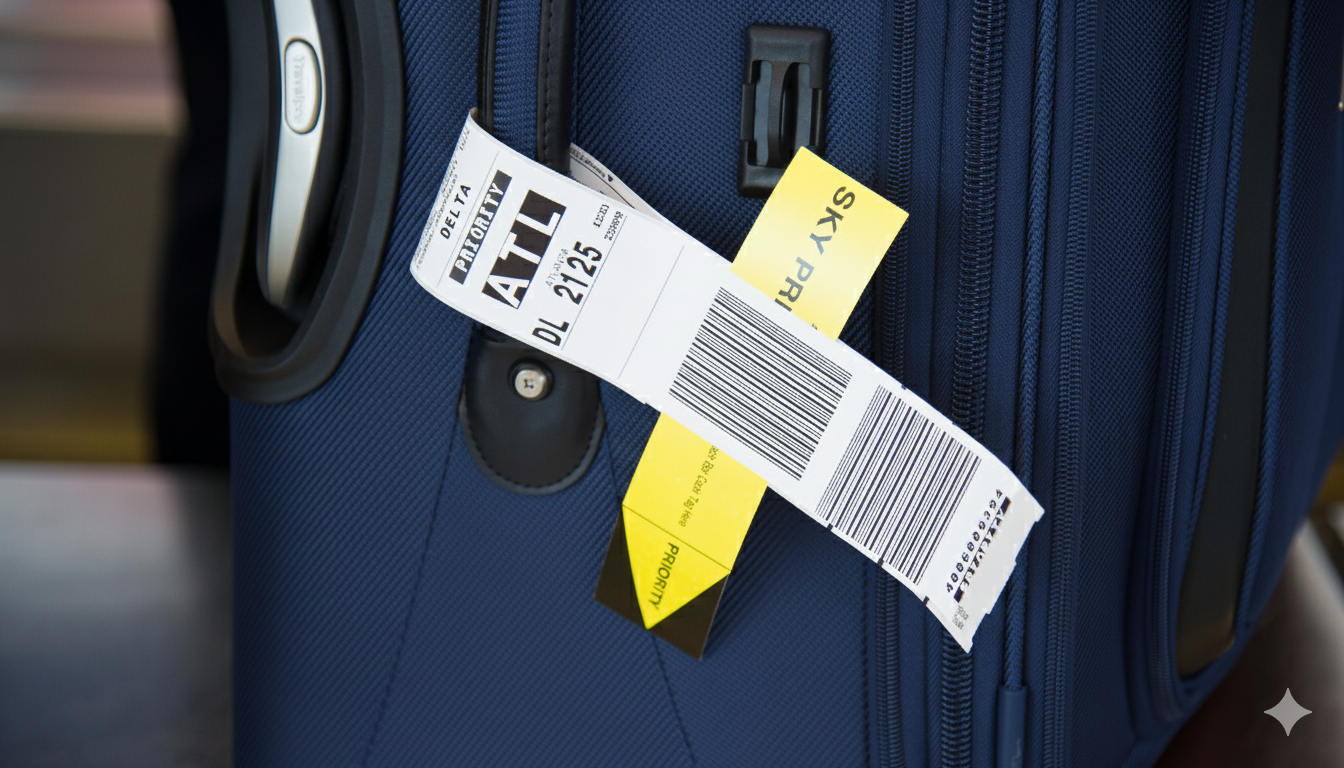
Losing track of checked baggage can turn an ordinary flight into a stressful experience. The Delta Baggage Tracker exists to solve exactly that problem. It allows passengers to follow their bags online, receive real-time updates, and understand what happens if luggage is delayed, missing, or lost.
This Flight To Fly guide explains how Delta’s tracking system works, why it matters, and how travelers can use it confidently before and after landing.
What Is Delta Baggage Tracker and Why It Matters to Travelers
Waiting at the baggage carousel without clear updates creates anxiety for most travelers. Passengers often have no visibility into where their checked bags are, especially during delays or tight connections.
Delta Baggage Tracker provides real-time tracking and status updates through digital tools designed to reduce uncertainty.
- Tracks checked baggage from check-in to final destination
- Sends alerts for delays, transfers, and arrival status
- Works online and through Delta’s mobile app
- Integrates with Delta baggage claim and customer support systems
Knowing where your luggage is helps restore control and confidence during air travel, especially when you understand how airline baggage rules work before you fly.
How Delta Baggage Tracker Works Behind the Scenes
Most passengers see updates on a screen, but the system behind them is more advanced. Traditional baggage handling relied heavily on manual scans and delayed reporting.
Delta uses barcode scanning, RFID technology, and automated baggage systems to update locations in real time.
- Bags are scanned at check-in, loading, transfers, and arrival
- RFID tags provide higher accuracy than standard barcode-only systems
- Data feeds directly into Delta Airlines Baggage Tracker platforms
- Updates sync with airport handling systems
This backend technology allows Delta Track Baggage features to stay accurate and timely.
Track Checked Bags in Real Time with Delta Air Lines Mobile App
Tracking your checked baggage becomes far easier when updates come directly to your phone. The Fly Delta Air Line Mobile App (Android & iOS) allows passengers to follow their bags in real time, from check-in to baggage claim, reducing uncertainty during connections, delays, or gate changes.
How Fly Delta App Works
Delta uses RFID technology on all checked luggage, allowing scanners at key points in the journey to update your bag’s status automatically. These updates appear inside the app without requiring manual refreshes or service desk visits.
- RFID tags update your bag’s location at check-in, loading, transfers, and arrival
- Push notifications alert you when your bag is loaded, transferred, or reaches the carousel
- An interactive map shows your bag’s journey, from a broad route view down to specific airports
- Apple Air Tag locations can be shared with Delta customer service through the app for faster recovery if needed
How to Use the Fly Delta App
Using the app requires only a few simple steps and works automatically once your trip begins.
- Download the (Android & iOS) Fly Delta app and log in with your SkyMiles account
- Open the “Today” tab to view your bag’s live status and location
- Enable notifications in your phone settings to receive real-time alerts
- Enter a bag tag number or confirmation code if the bag is not linked to your account
This system offers a high success rate for tracking checked luggage and helps Delta reunite passengers with their bags more quickly, even when flights are delayed or itineraries change.
Delta Baggage Tracker Online: Tracking Without the App
Not every traveler installs airline apps. Passengers still need reliable tracking options without mobile downloads. Delta Baggage Tracker Online allows tracking through Delta’s website.
- Enter your confirmation number or baggage tag number
- View current bag status and last scanned location
- Access updates on desktop or mobile browsers
Online access ensures Delta Airlines Baggage Tracker remains available to all travelers.
Delta Lost Baggage Tracking vs Delayed Baggage Tracking
Not all baggage issues mean the same thing, even though they often feel similar to passengers. When a bag does not arrive on the carousel, the situation could be delayed, missing, or officially lost.
Delta categories these scenarios clearly so passengers know what stage their baggage is in and what to expect next.
| Baggage Status | What It Means | What Delta Does |
| Delayed baggage | The bag missed your flight or connection but is located | Routes the bag on the next available flight and updates tracking |
| Missing baggage | The bag has not been located yet but is under active search | Begins a search across Delta’s baggage network and partner airlines |
| Lost baggage | The bag was not recovered after the defined search period | Moves the case to compensation and claims processing |
Understanding the difference between delayed, missing, and lost baggage helps reduce unnecessary stress. It also allows travelers to respond correctly within Delta’s system, whether that means waiting for delivery updates or beginning a claim.
Clear definitions set realistic expectations during Delta Lost Baggage Tracking and prevent confusion at baggage services counters.
How Accurate Is Delta Baggage Tracker
Accuracy determines whether tracking builds trust or frustration. Inaccurate tracking can lead to misinformation and delays. Delta reports industry-leading tracking accuracy using RFID and scan verification.
- RFID technology improves scan reliability
- Multiple scan points reduce blind spots
- Real-time syncing limits outdated status reports
For most routes, accuracy remains high, especially on domestic and major international flights.
What to Do If Delta Baggage Tracker Shows “Delayed”

Seeing a “delayed” status raises immediate concerns. Passengers may not know the next steps after receiving a delay alert. Delta provides a clear response process once a delay appears.
- Monitor updates through Delta Missing Baggage Tracker
- File a report at the airport or online if required
- Receive delivery options once the bag arrives
Prompt action speeds up resolution and reduces stress.
Delta Baggage Claim Tracking for Missing or Lost Bags
Claims feel overwhelming without guidance. Passengers worry about compensation timelines and documentation. Delta Baggage Claim Tracking simplifies follow-ups through digital channels.
- Submit claims online or at the baggage service office
- Track claim status digitally
- Upload receipts and documents securely
Clear claim tracking keeps travelers informed throughout the process.
Delta Airlines Lost Baggage Tracker: Compensation and Timelines
Compensation matters when luggage is not recovered. Unclear timelines create confusion and frustration. Delta Airlines Lost Baggage Tracker outlines compensation steps clearly.
- Claims typically open after the search period ends
- Compensation aligns with domestic and international regulations
- Payments vary by route and declared value
Understanding timelines prevents unrealistic expectations.
3 Tips to Avoid Losing Luggage on Delta Flights

Most baggage issues do not start at baggage claim. They begin before your bag enters the system. Bags that look identical, lack clear identification, or move through tight connections are more likely to be delayed or misrouted.
By preparing your luggage properly, following the Delta airline baggage policy, and making smart choices at the airport, you can significantly reduce the risk of problems while flying with Delta.
Before You Go To Flight
Most baggage problems start before your bag ever reaches the airport conveyor belt. A few simple preparation steps can make your luggage easier to identify, track, and recover if anything goes wrong.
- Identify Your Bag
Make your bag stand out using bright tape, ribbons, or a distinctive cover. Plain black bags are common and easily mistaken, especially during busy arrivals.
- Tag Clearly
Use durable luggage tags with your name, email, and phone number, and avoid listing your home address. Place a business card or contact sheet inside the bag as a backup in case the outer tag is damaged.
- Remove Old Tags
Old airline stickers and barcode tags can confuse scanners and lead to misrouting. Removing them ensures your bag is read correctly by Delta’s tracking systems.
- Photo Your Luggage
Take clear photos of your packed bag, both inside and out. These images help Delta Lost Baggage Tracking teams identify your luggage quickly if needed.
- Pack Essentials in Carry-On
Keep medication, valuables, electronics, and a change of clothes in your carry-on. This reduces disruption if your checked bag is delayed.
- Use a Tracker
Placing an AirTag or similar device inside your bag gives you an extra layer of visibility beyond airline scans.
- Check Size and Weight
Make sure your carry-on meets size and weight limits to avoid forced gate-checking, which increases handling and transfer risk.
At the Airport and During Travel
How and when you check your bag plays a major role in whether it arrives smoothly. Small checks at the airport can prevent avoidable delays later.
- Check In Early
Give your bag enough time to be processed and loaded, but avoid checking in excessively early. Follow airline guidance for optimal timing.
- Book Smart
Non-stop flights reduce the risk of baggage transfers. If you are connecting, allow enough time for bags to move between aircraft.
- Verify Tags at the Counter
Before leaving the check-in desk, confirm that the baggage sticker shows your final destination. Correcting errors early prevents misrouting.
- Secure Your Bags
Use TSA-approved locks and remove loose straps that could snag on conveyor belts or handling equipment.
- Claim Quickly
Arrive early at the baggage carousel so you can identify your bag before it is mistakenly removed or redirected.
Delta Airline 20-Minute Bag Guarantee Rule
Delta offers clear policies that give passengers added confidence when checking bags, especially on domestic routes. Knowing these details helps you act quickly if expectations are not met.
Delta’s 20-Minute Baggage Guarantee applies to domestic flights and offers 2,500 bonus miles if your checked bag does not reach the carousel within 20 minutes of arrival. To receive the miles, you must submit a claim through Delta’s official channels shortly after landing.
Understanding Delta-specific protections adds another layer of reassurance when travelling with checked baggage.
How Delta Baggage Tracker Compares with Other Airlines
Not all airline tracking systems offer the same reliability. Travellers struggle to compare tracking standards across airlines. Delta stands out due to early RFID adoption.
- Higher scan accuracy than barcode-only systems
- Consistent mobile and online tracking tools
- Faster update frequency
For travellers comparing airlines, tracking reliability can influence booking decisions alongside allowances, such as airlines with higher baggage limits like Airlines with 40kg baggage allowance.
Which Delta baggage reference number do I need for Delta Baggage Tracker, and where can I find it?

When you use Delta Baggage Tracker, the system may ask for a reference number. That can be confusing because Delta uses different numbers for tracking, filing a claim, and following up at a service center.
Here’s how to know which one you need, especially when you want to track online or speak to support. For Delta Baggage Tracker, you’ll usually use one of these reference numbers:
- Bag Tag Number (for tracking online in real time)
- This is the long number printed on the baggage tag attached to your suitcase and on the small baggage receipt you get at check-in.
- You can also find it in the Fly Delta app under your trip, or in your check-in email.
- Use this number to track online through Delta Baggage Tracker (website or app) and see live updates on your bag.
- Confirmation Number (to load your trip and bags)
- This is your 6-character booking code made of letters and numbers.
- It appears on your booking confirmation email, e-ticket, and inside the Fly Delta app.
- Enter this on delta.com or in the app to pull up your trip; once the trip loads, Delta Baggage Tracker will automatically show any checked bags linked to that booking.
- File Reference Number (for baggage claim and service center follow-ups)
- If your bag is delayed, missing, or damaged and you file a baggage claim, Delta will give you a file reference number (also called a PIR or claim number).
- You’ll see it on the printed report from the airport baggage service center, in your claim confirmation email, and on the online claim status page.
- Use this number when checking your claim status, tracking a problem bag beyond normal scans, or when contacting the Delta baggage service center for updates.
Use your bag tag number or confirmation number to track online in Delta Baggage Tracker, and use your file reference number when you have an active baggage claim or need help from a baggage service center.
Delta Baggage Tracker User FAq’s
Q1: What phone number can I call for Delta lost baggage and baggage customer service?
A1: If you cannot find your bag or need an update beyond Delta Baggage Tracker, you can call Delta’s baggage service desk at 800-325-8224 within the U.S. for help with delayed, lost, or damaged baggage.
From outside the U.S., many travellers are directed to use Delta’s international contact numbers or the local Delta office; the baggage service desk is often listed as +1-404-209-3043 in third-party baggage support references.Myticketstoindia+1 Always check delta.com for the latest contact details.
Q2: Can I use Delta Baggage Tracker for international flights and connections?
A2: Yes. Delta Baggage Tracker works on most domestic and international Delta-operated flights, including many connections.
On some partner or codeshare segments, tracking may be limited if the partner airline uses a different system, but you can still file a report with Delta if the final flight on your itinerary is Delta-operated.
Q3:Can I track multiple checked bags with Delta Baggage Tracker?
A3: Yes. If you check more than one bag on your trip, Delta Baggage Tracker shows each checked bag separately in the Fly Delta app or on the tracking page.
You will see individual status lines or tiles for each bag, so you can confirm that all of them are loaded and arrive at baggage claim.
Q4: Does Delta Baggage Tracker work with Apple AirTag or other trackers?
A4: Delta’s own system does not depend on AirTags, but you can use personal trackers alongside Delta Baggage Tracker.
Delta and Apple have also been testing tools that let AirTag location data flow into Delta’s baggage systems, making it easier to share your tracker location with Delta during a search.
Q5: Can I still use Delta Baggage Tracker if I booked through a partner airline?
A5: If you booked through a partner or codeshare but your final flight is operated by Delta, you can usually still use Delta Baggage Tracker with your bag tag number or Delta confirmation number.
If the last operating carrier is not Delta, that airline is generally responsible for tracking and resolving baggage issues, though Delta may still assist if part of the journey was on its metal.
Q6: What can I do if Delta Baggage Tracker is not updating or shows no information?
A6: If Delta Baggage Tracker is not showing updates, try:
- Checking that you entered the correct bag tag or confirmation number
- Refreshing the Fly Delta app or logging out and back in
- Waiting a short time, as scans may not post instantly
If there is still no information and your bag has not appeared, visit the Delta Baggage Service Office at the airport or call the baggage desk (800-325-8224 in the U.S.) to open a report and get human support.
Q7: Does Delta charge extra to use Delta Baggage Tracker, or is it free for all passengers?
A7: No, you do not need to pay any extra charges to use Delta Baggage Tracker. The tracking system is included as part of your normal ticket and baggage handling; it is available to all passengers who check bags with Delta.
You can use it for free through the Fly Delta mobile app or Delta’s website to see your bag’s status in real time, without any additional fee.